Remove "Ask Gemini" from Chrome Right-Click Menu
Quickly remove and disable the "Ask Gemini" option from the Google Chrome right-click context menu, hiding it completely.
Copy Flag Address
Click the box below or the copy button to copy the Chrome experimental flag address:
Open in a New Tab
Open a new tab in Chrome (shortcut: Ctrl + T or Cmd + T), paste the address you just copied into the address bar, and press Enter.
Disable Glic
On the flags settings page, look for the option named Glic (it should be highlighted automatically). Change its dropdown selection from Default or Enabled to Disabled.
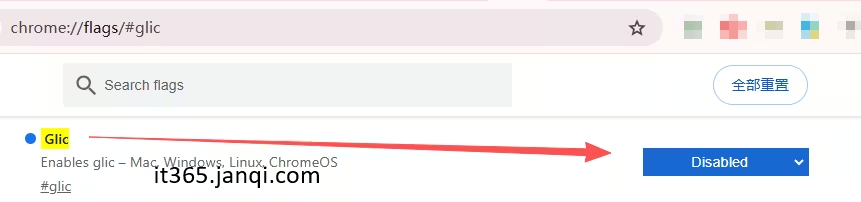
Relaunch Chrome
After changing the setting, a prompt to relaunch Chrome will appear at the bottom of the page. Click the Relaunch button in the bottom right corner. Once the browser restarts, the "Ask Gemini" option will be successfully removed from your right-click context menu!
How to Restore "Ask Gemini" in Chrome Context Menu?
If you want to bring the "Ask Gemini" option back later, simply follow these steps to restore it:
- Click to copy and open
chrome://flags/#glicin your browser. - Change the Glic setting back to Default or Enabled.
- Click the Relaunch button at the bottom of the page to restart your browser.
Recommended Free Tools
Online Word Toolbox
Edit, format, and layout Word docx files directly in your browser. No login or installation required.
Online PDF Toolbox
Merge, split, compress, watermark, and edit PDF metadata or tables of contents offline locally.
Side-by-Side Word/PDF Viewer
Preview and compare two Word, PDF, or text files side-by-side with synchronized scrolling.
PDF Auto-Scroll Reader
Open and read PDF files with smooth hands-free auto-scrolling at adjustable speeds for comfortable reading.
Text Processing Tools
Batch search/replace, add prefixes/suffixes, extract URLs or emails, and automatically convert them into clickable links.
Delete Empty Rows in Excel
Quickly remove blank rows in Excel spreadsheets, including all, bottom, or middle blank rows. Batch delete without losing any original data.
Compare Word Docs with Sync-Scroll
Open two Word documents side-by-side with high-precision synchronized scrolling. Great for comparing contract drafts or paper revisions.