Free & Open Source PDF Editor & Suite
A modern, cross-platform PDF suite built with Qt and C++20, providing multi-threaded fast rendering, text editing, PDF diffing, and page reorganization.
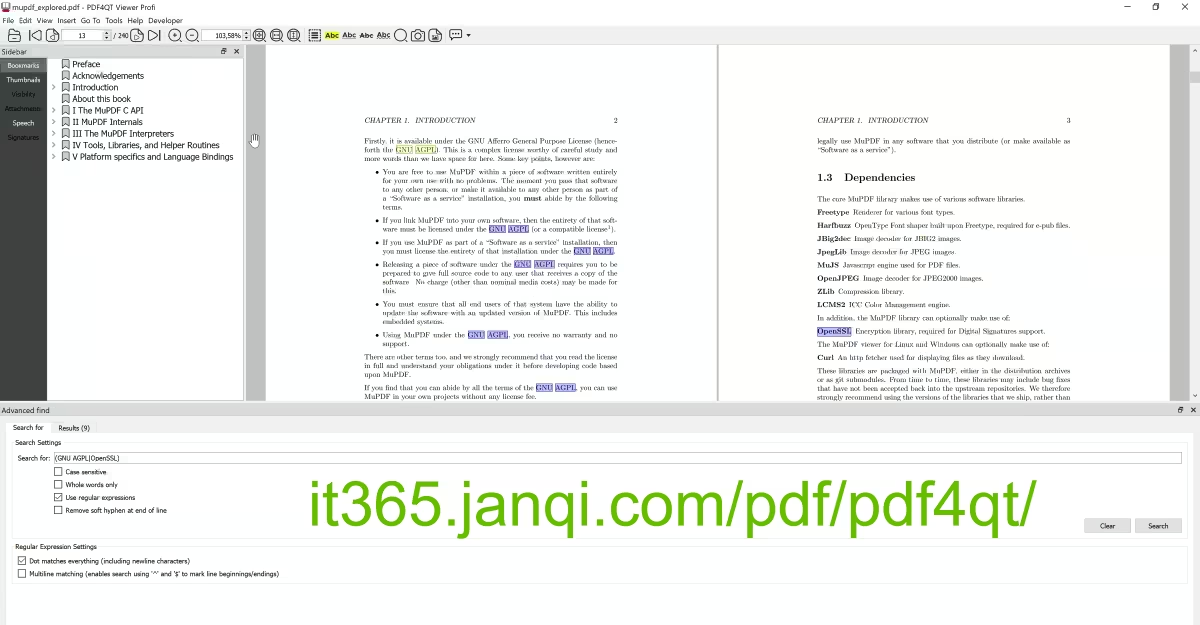
PDF4QT Core Components
PDF4QT is not a single application, but a complete suite of independent tools designed for professional PDF processing.
PDF4QT Editor
Directly edit inline text within PDF documents, adjusting fonts, colors, and layouts. Insert images, custom hyperlinks, redact sensitive private data (physical overlay protection), and insert form fields.
PDF4QT Diff (PDF Comparison)
Compare the content of two PDF documents side-by-side in dual windows, highlighting difference locations. Supports synchronized scrolling, automatically marking modifications, additions, and deletions with red/green highlights.
PDF4QT Organizer
Visually merge, split, and reorganize pages. Offers thumbnail grid preview, drag-and-drop page ordering, one-click rotation for correction, page deletion, or specific page extraction.
PDF4QT Viewer
Employs multi-threaded and multi-rendering backends (hardware acceleration & software rendering), perfectly adapting to 4K/8K high DPI displays. Supports annotations, highlights, underlines, interactive form filling, and built-in Text-to-Speech (TTS).
Key Features of PDF4QT
Multi-threaded Rendering Engine
Built on C++20 features, it fully utilizes modern multi-core CPUs for multi-threaded rendering, making page flipping and rendering of large PDFs or high-resolution drawings lightning-fast.
Digital Signature Validation
Built-in industry-standard digital certificate validation to verify the authenticity, integrity, and signer identity of digitally signed PDF documents.
Text-to-Speech Mode (TTS)
Integrated system-level TTS module. Launch 'audiobook reading mode' via the quick toolbar to automatically analyze text flow, providing speed/volume adjustment and high-fidelity speech output to free your hands and eyes.
Private Physical Redaction
Includes professional redaction tools to physically overwrite and erase protected personal identity data in PDFs, making it impossible to select, search, or restore.
CLI Automation Tools
Provides a full-featured CLI utility for advanced developers, allowing you to execute PDF merging, conversion, and other automated tasks directly in the terminal without opening the UI.
Ad-Free & Pure Offline Security
As completely free, open-source LGPLv3 software, there are absolutely no pop-up ads or bundled installers during installation and execution, and no user privacy telemetry is collected.
PDF4QT vs KillerPDF
Two excellent free, open-source PDF tools. Which one fits your workflow better?
| Feature | PDF4QT (Feature-rich) | KillerPDF (Lightweight & Portable) |
|---|---|---|
| Size & Installation | Feature-rich, includes multiple professional components, requires installation | Extremely small size (~6MB), single executable file, portable & green |
| Text Editing | Supports advanced text, image, multimedia, and link editing | Supports direct inline text editing with smart font matching |
| PDF Diffing | Supports dual-window sync scrolling and difference highlighting | Not supported |
| Page Reorganization | Independent page manager with drag-and-drop reordering | Supports page extraction, rotation, deletion, merging/splitting |
| OS Support | Cross-platform (Windows & Linux) | Windows only (Windows 10/11 64-bit) |
| Advanced Features | Digital signature validation, TTS reader, CLI automation tools | Annotation, drawing, handwritten signature insertion, document flattening |
| Privacy & Security | Completely offline execution, no telemetry or data collection | Completely offline execution, no telemetry or data collection |
| License | LGPLv3 Open Source | GPLv3 Open Source |