Create Polished Demo Videos Without Extra Editing
Recordly is a desktop screen recorder and video editor with a built-in demo-grade zoom and cursor polish engine. No need to send raw footage to a motion designer; get it done for free, instantly, all in one place.
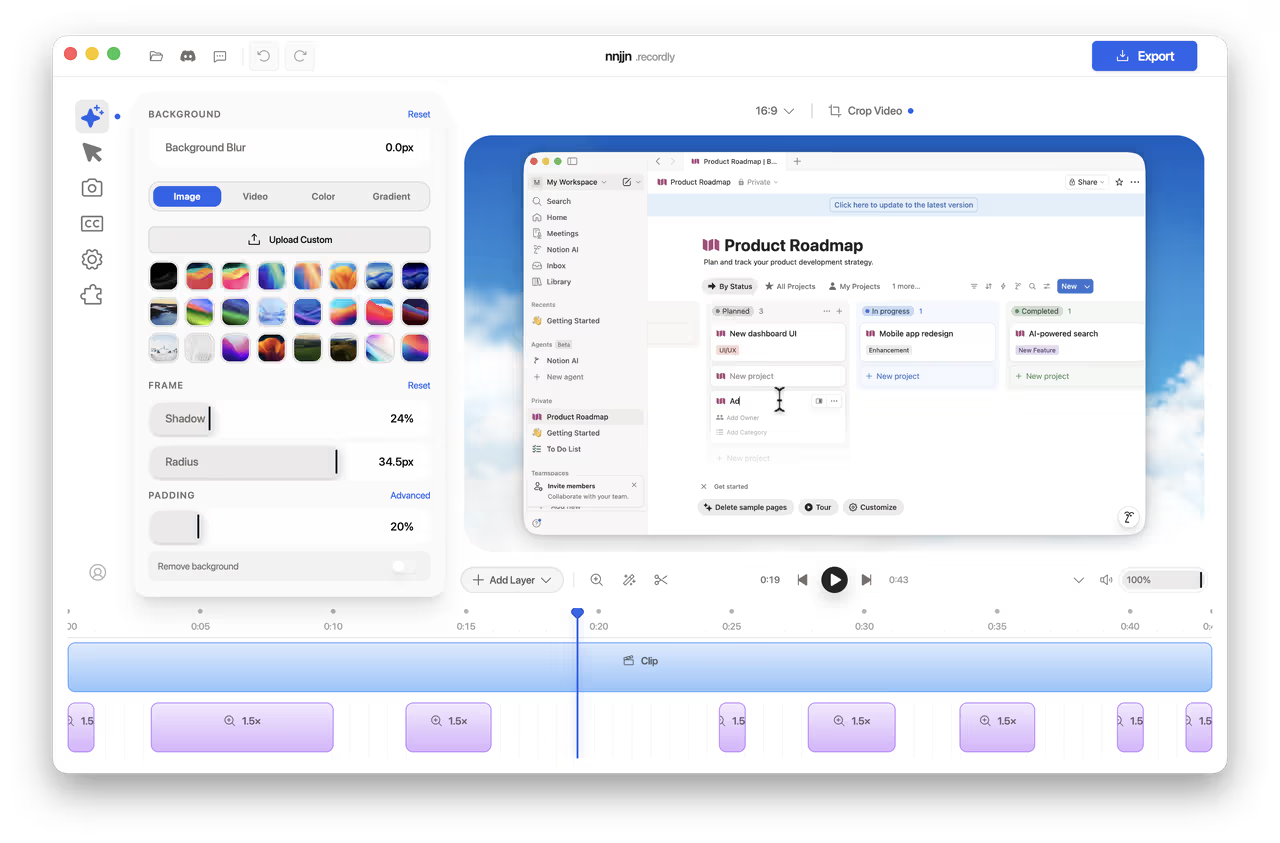
Key Features
Discover why Recordly is the best choice for tutorials, software demos, and promotional videos.
Auto Zoom & Cursor Smoothing
Intelligently identifies and highlights cursor actions. Recordly automatically suggests zoom regions, smooths erratic mouse movements, and adds motion blur and click ripples to keep your videos engaging and fluid.

Dynamic Web Camera Bubbles
Transform webcam footage into rounded bubble overlays. Drag and drop to presets or custom coordinates with real-time controls for mirroring, shadows, and corner radius. Enable “linked zoom” to automatically scale the face bubble in sync with the screen zoom.

Demo-Centric Timeline
Skip complex video editors. Our drag-and-drop timeline lets you trim footage, configure zoom centers, mix audio tracks, and adjust clip speeds (speed up or slow down) with ease. Save everything as project files to resume work anytime.
Extensions & Wallpaper Marketplace
Recordly features a thriving community-driven extension system. Load third-party extensions and theme wallpapers to customize device frames, mock browser windows, cursor sounds, rendering hooks, and advanced options.
Recordly vs. Conventional Recorders: Built for Demo Videos
Why is Recordly the best choice for video tutorials, product walkthroughs, and vlogs?
Standard Screen Recording
(e.g., Bandicam, OBS, EV, Kap, etc.)
- No Focus Zoom: No automatic zoom on click or active areas, making fine details hard to read.
- High Post-Production Cost: Requires manual keyframing and cropping in heavy video editors, costing hours of work.
- Lack of Effects: Flat cursor movements without transition smoothing, motion blur, or click ripples.
- Generic Backgrounds: Cannot wrap application windows in clean browser shells or style them with shadows and wallpapers.
Recordly Smart Demo Recorder
(Free & Open Source · Zero Post-Editing)
- Simple & Free: Incredibly easy to use. Create professional product demo videos with automatic zooms and smooth cursor animations at zero cost.
- Smart Zoom: AI tracks cursor movements and clicks to create smooth zoom transitions automatically.
- Polished Cursors: Built-in motion blur, click ripples, and high-definition cursor styles replace raw pathways.
- Beautiful Backgrounds: Supports webcam bubbles, device frames, stylish canvas wallpapers, and blur/shadow styling.
- Efficient Workflow: Tailored for video guides, vlogs, and landing page videos. Skip heavy post-editing and export polished demos instantly.
Complete Feature List
Fully packed with professional features. 100% open-source, catering to all your recording needs.
⏺️ Screen Recording
- Record full screen or select a specific application window
- Instant, seamless media load into the editor right after recording
- Simultaneous capture for microphone and system audio
- High-performance native capture engines for macOS and Windows
- Load existing `.recordly` project files at any time to resume editing
✂️ Timeline & Editing
- Intuitive drag-and-drop multi-track timeline
- Trim and split footage with one click to remove unwanted parts
- Manually set zoom centers and scale ratios
- Smart zoom recommendations based on dynamic mouse tracking
- Add speed up or slow down motion curves to key sections
- Annotate with text, custom shapes, callouts, and layered images
🖱️ Cursor Styling
- Option to show or hide the virtual rendering cursor in export
- Customize and scale virtual cursor size
- Cursor pathway smoothing and motion blur effects
- Click ripple animations, bounce effects, and click sound options
- Configure loops with one click for flawless GIF exports
- Built-in high-definition cursor styles (including macOS presets)
📷 Webcam Overlay
- Floating webcam overlay for facecam recording
- Set location freely with classic 3x3 layout presets
- Toggle horizontal webcam mirror
- Adjust shadows, border radius, and feather effects
- Webcam size dynamically scales alongside active screen zoom
🎨 Canvas Styling
- Includes multiple abstract concepts and nature wallpapers
- Load custom wallpapers from a local directory
- Solid colors, gradients, and custom shadow overlays
- Add canvas paddings around the window for breathing room
- Enable background Gaussian blur and multi-layered drop shadows
💾 High-Def Export
- Export directly as MP4 or micro-animation Web GIFs
- Adjust compression quality to balance file size and visual fidelity
- Adjust frame rate and toggle infinite loop for GIFs
- Built-in resolution presets for mobile and small display layouts
- Quickly locate exported files in file explorer